


Google has decided to sunset the experimental “Tab Scrolling” feature that allowed users to navigate through open tabs with a scrolling mechanism rather than compressing them into increasingly smaller spaces.
The feature, which had been available through Chrome’s experimental flags system, is now being officially deprecated according to recent commit logs.
Summary
1. Google is removing Chrome's experimental "Tab Scrolling" feature that enabled scrolling through tabs instead of tab compression.
2. Feature pulled from Chrome Labs last month with commits confirming sunset and upcoming flag removal.
3. Users lose scrollable tab navigation, auto-scroll dragging, and optimized button positioning.
4. Chrome users who relied on this feature for better tab management will need to adapt to the default tab compression behavior or seek alternative solutions.
Removing Tab Scrolling in Chrome
The Tab Scrolling feature was designed to address a common pain point for power users who frequently work with numerous open tabs.

Instead of the default behavior where tabs continuously shrink to accommodate more tabs in the same space, Tab Scrolling maintained consistent tab widths and implemented a horizontal scrolling mechanism to navigate through them.
According to recent commits in the Chromium codebase, Google pulled this feature from Chrome Labs approximately one month ago.
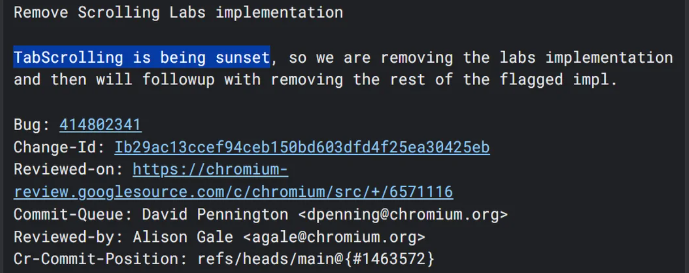
The technical documentation explicitly mentions that the feature is being “sunset,” indicating a deliberate decision to discontinue this particular user interface approach, reads a Reddit post.
The flag that enabled this functionality (#scrollable-tabstrip) will soon be completely removed from Chrome’s experimental features, marking the definitive end of this alternative tab management method.
The Tab Scrolling feature was implemented through Chrome’s experimental flags system, accessible via the chrome://flags interface.
This mechanism allows Google to test potential features with a subset of users before deciding whether to integrate them into the main browser experience.
Prior to the deprecation decision, Google engineers were actively refining the feature. Recent development efforts focused on optimizing the position of tab scrolling buttons and enhancing drag-and-drop functionality.
One particularly useful improvement was the implementation of auto-scroll behavior when users dragged tabs to the edge of the visible tab strip.
Implications for Chrome Users and Alternatives
The removal of Tab Scrolling functionality represents a strategic decision in Chrome’s user interface evolution. Power users who relied on this feature will need to adapt to Chrome’s default tab management behavior or seek alternative solutions.
For users who prefer the scrollable approach, several alternatives remain available. Chrome extensions like “Tab Manager Plus” or “OneTab” offer different approaches to tab organization.
Additionally, competing browsers like Firefox and Edge implement their own versions of tab scrolling or grouping that might appeal to displaced Chrome Tab Scrolling enthusiasts.
Google’s browser development team continues to experiment with other tab management features, including tab groups and tab search functionality, suggesting that while Tab Scrolling didn’t make the cut for permanent integration, the company remains committed to improving tab organization for users who navigate complex workflows across multiple web pages.
Investigate live malware behavior, trace every step of an attack, and make faster, smarter security decisions -> Try ANY.RUN now
